
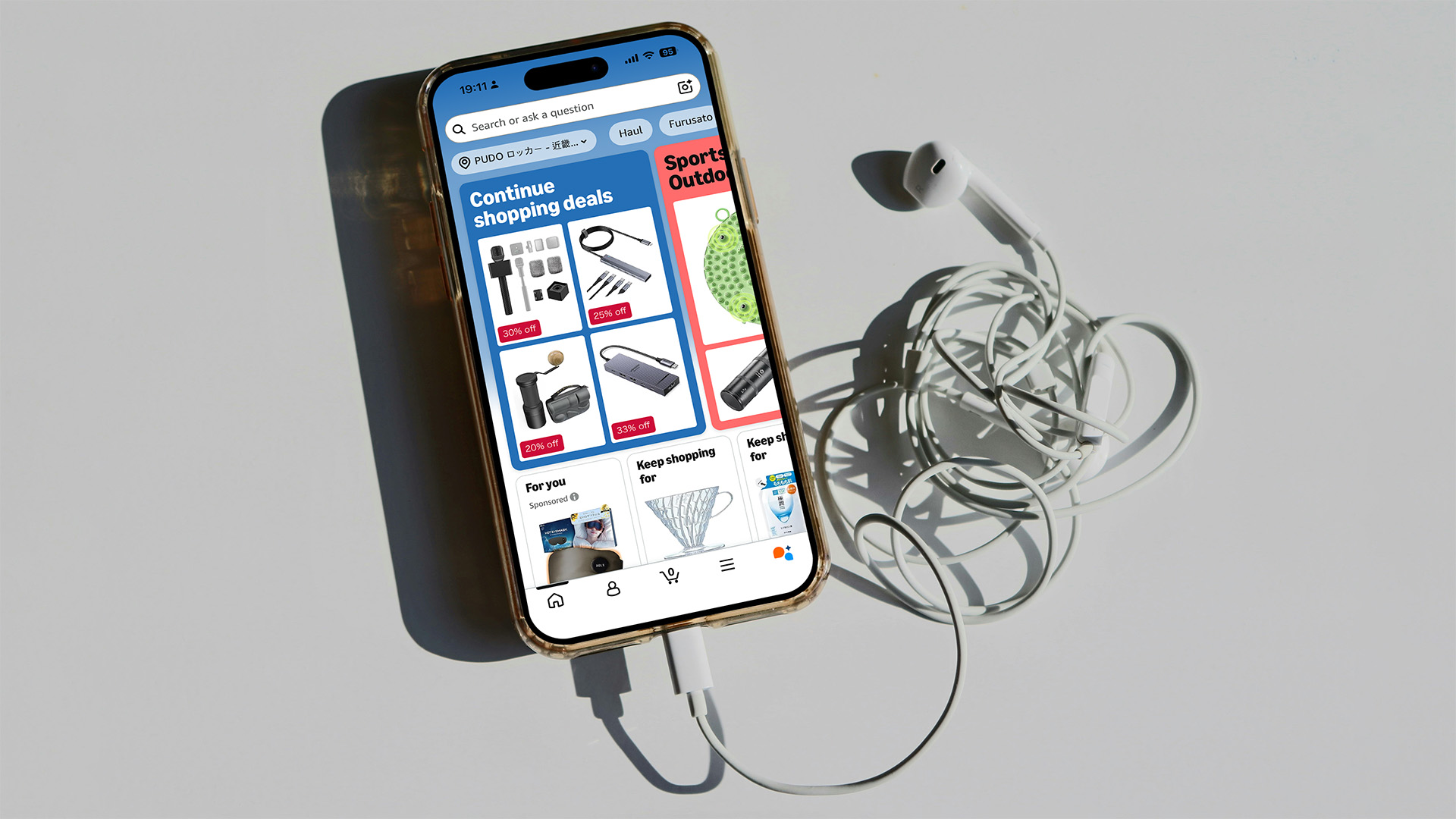
Disclosure: This article contains affiliate links. If you click a link and subsequently make a purchase, we may earn a small commission at no extra cost to you. The Amazon Japan link in this article is the explicit Japanese storefront (amazon.co.jp). Affiliate partnerships never influence our editorial verdicts.
Want to shop on Amazon Japan while you’re in Japan, or even before you fly? Good news: you can set up a fully working Japanese Amazon account from anywhere in the world, with nothing more than an international email address, an international phone number, and a credit card that works online. No Japanese address required to start. No residency card. No Japanese phone contract.
If you want to know how to use Amazon Japan when travelling in 2026, including the bits that aren’t well documented in English, the parts that confuse first-time users, and the parts that save real money, this is the guide. Once you’re set up, you can shop from your sofa at home, schedule delivery to a parcel locker a day or two after you touch down, and pick it up between train stops. That’s the underrated bit: the parcel locker holds the box for you, so you don’t have to be at the hotel front desk at a specific hour or be in the same city on a specific day. (Pro move: place the order for non-perishable items from your sofa the week before you fly. The basket lands in a konbini or Hub Locker and is waiting when you walk in.) You can order from abroad, have the parcel waiting when you arrive, and keep shopping through the rest of the trip.
This guide walks through the whole thing: setting up an account, getting the right storefront in the app, choosing a delivery option that actually works on a moving trip, and the honest “is it really cheaper?” calculation. The setup itself takes about five minutes. Everything after that is just shopping.
Also read: Must-Have Apps for Travelling to Japan — the broader app stack I use (eSIM, VPN, taxi and more), and the Surfshark VPN I run on every public Wi-Fi network I touch during travels.
In This Amazon Japan Guide
Quick Links
- 🛍️Set up Amazon Japan (free, international cards accepted):
Create your Amazon Japan account → - 📱Need data to actually do this on your phone?
Airalo Asialink eSIM (Japan, KR, HK, SG and 14 more) — useNEWTOAIRALO15for 15% off your first plan. - 🔒Need a VPN for hotel and airport Wi-Fi?
Surfshark (extra discount via our partner link)
Why Amazon Japan Is the Underrated Hack for Travellers
If I had to pick one app on this whole site that tourists underestimate the most, it would be Amazon Japan. Not Airbnb. Not Google Maps. Not even the eSIM. Amazon Japan, by a long way. Most travellers who find out about it can’t believe how easy the setup is. That gap between “sounds hard” and “is actually five minutes” is exactly what this guide on how to use Amazon Japan when travelling is built to close.
Here’s what you actually get with a working Japanese Amazon account on a trip:
- Access to the full Japanese catalogue. A huge number of products simply do not ship from the global Amazon site. Products like certain cosmetics, skincare, snacks, stationery, kitchen gear, electronics, and niche hobby supplies are available only on amazon.co.jp. Until you have a Japanese account, you effectively don’t have a way to buy them, period.
- Weak-yen pricing on big-ticket items. Thanks to the yen staying weak against the US dollar and the euro, phones, laptops, headphones, cameras, and audio gear are often cheaper on Amazon Japan than on Amazon at home. It’s not always cheaper, but on many products it is, and the spread is wide enough that it’s worth comparing prices before you assume your local store wins.
- Pickup lockers and convenience-store pickup, basically everywhere. Japan has a network of Amazon pickup lockers at train stations, in standalone locations, and even in some convenience stores across the country, including outside major cities. Add to that the option to pick a parcel up at a Lawson or FamilyMart counter, and you’ve got thousands of pickup points that don’t require a permanent address. You don’t need a Japanese phone number for any of them: the Amazon app sends you a one-time code, which opens the box.
- Returns work the same as any Amazon account. Customer service, refunds, and the A-to-Z guarantee all apply, even on items you bought in Japan from abroad. English-language support is available in the app’s help section, and the refund can be credited to the same international card you use to pay.
- You can set it up before you fly. This is the bit most guides miss. You can create the account, set up the payment method, browse, and even place your first order from your sofa at home. The parcel will be in a locker for you when you arrive. Great for “I only have three days in Tokyo” trips, or for stocking up a holiday home in the Japanese countryside before the season starts.
The combination of easy setup from abroad, broad catalogue, and pickup lockers that hold your parcel is what makes it the hack.
What You Need Before You Start
Three things, and almost certainly you already have all of them:
- An international email address. The same one you’d use to sign up for any other online service. Gmail, Outlook, ProtonMail, Fastmail, your work email, any of them works.
- An international phone number that can receive SMS. Your normal mobile number is fine, in any country. The account creation form will ask for the country code, then the local number, then send a one-time verification code. VoIP numbers (Google Voice, TextNow) can be hit-and-miss with Amazon’s SMS system, so a real mobile number is the safer bet.
- An international credit or debit card that works for online transactions. Visa, Mastercard, and American Express all work on amazon.co.jp out of the box. You don’t need a Japanese-issued card.
That’s it. No Japanese address is required to create the account or to start shopping. You will, however, need some delivery address to actually place an order. That’s a separate step, covered below. The three options are a pickup locker, a hotel/ryokan, or your own accommodation’s doorstep. None of them requires a permanent address in Japan.
If you’ve got a working data connection while you set it up, the whole thing takes about five minutes. If you don’t, the Airalo Asialink eSIM I use includes Japan in its plan and can be installed before you even leave home, meaning you can land with data on, run through this whole guide, and have a parcel in a locker by tomorrow. There’s a full walkthrough of that side in the Airalo review I wrote after months of using it across Asia.
Set Up Your Amazon Japan Account in 5 Minutes (From Anywhere)
These steps work equally well from your kitchen table at home and from a seat on a Shinkansen. I’ve done both.
- Go to amazon.co.jp directly. Important: do not search “Amazon” on Google and click the first result — Amazon auto-redirects visitors to their local storefront based on IP, and a quick search from most countries will land you on amazon.com, amazon.co.uk, or wherever Google thinks you are. For simplicity, click the link above. The link we’ve included accepts international cards natively; the address fields will accept non-Japanese billing addresses without complaint.
- Download the Amazon Shopping app on iOS or Android. Sign in with the same credentials. This is the app you’ll actually use on the trip: it handles pickup locker codes, order tracking, and in-app translation. More on all of those in a moment.
- Add a delivery address — or skip this for now. The account works fine without one until you try to check out. The first time you do, the address field will offer to use your current location, find a pickup locker, or accept a manual address. If you’re at home, you can enter your home address and start shopping now, with the parcel waiting for you on arrival (or being forwarded to a locker later). If you’re already in Japan, jump to the next section.
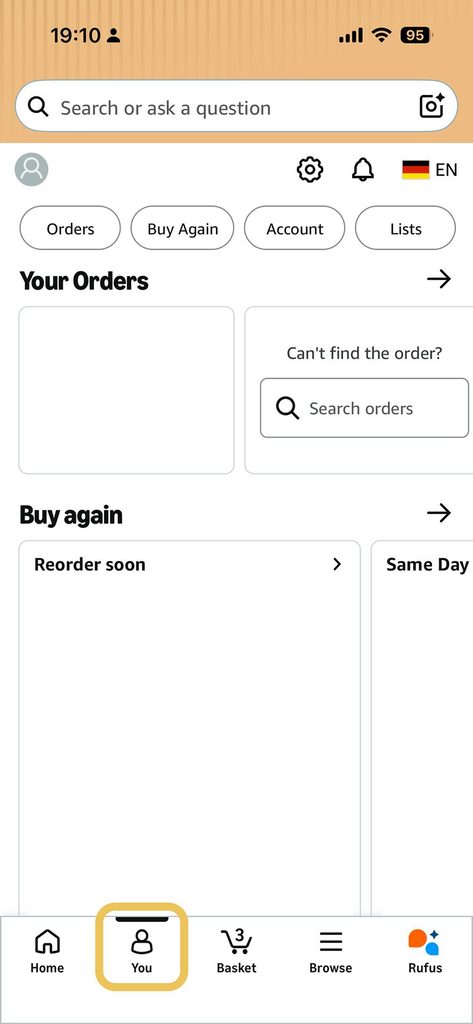
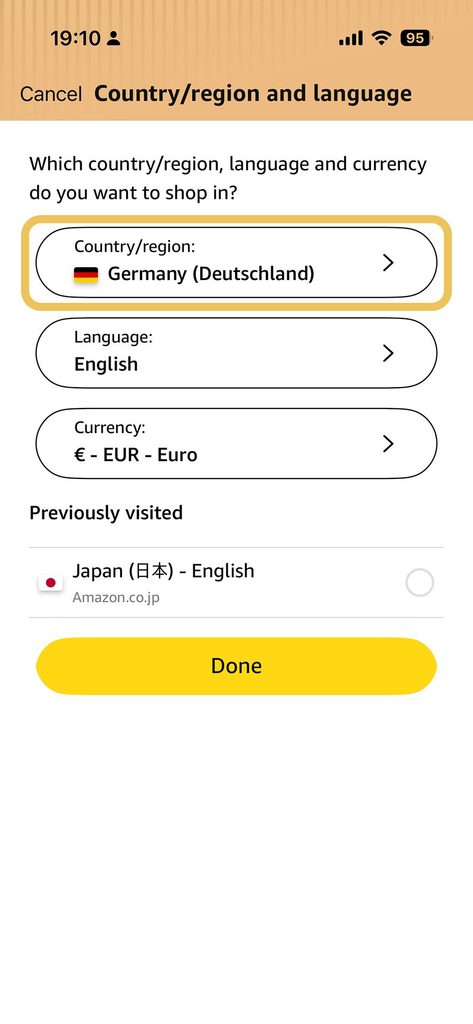
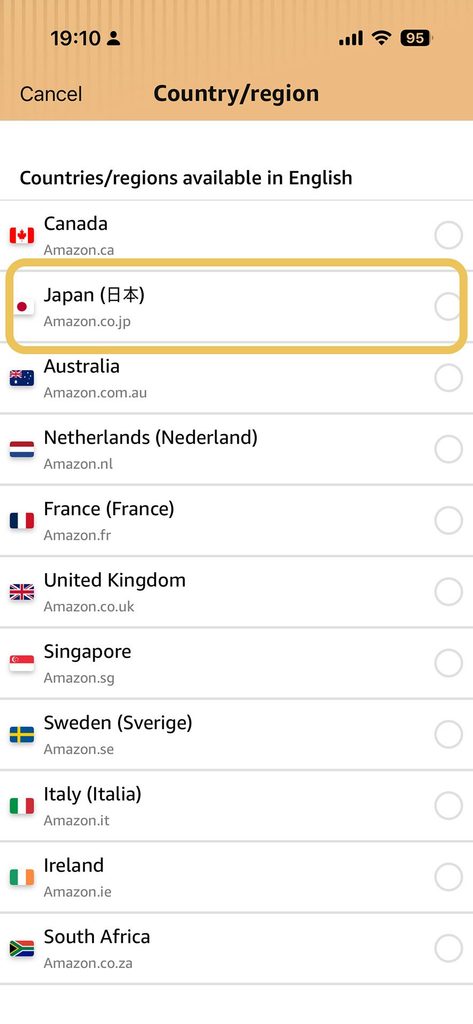
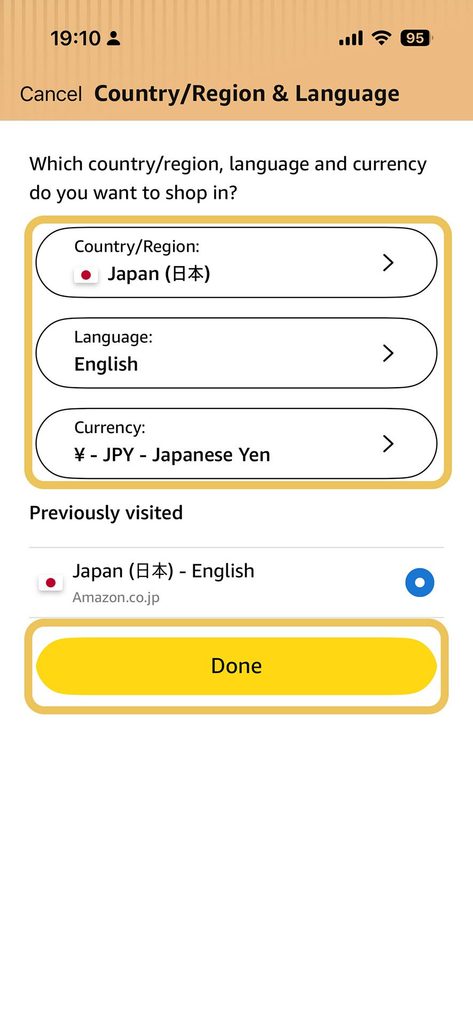
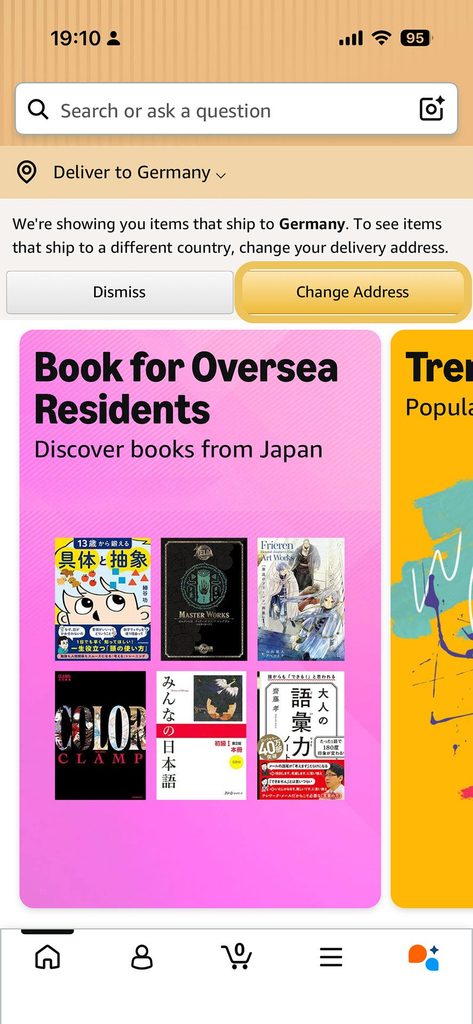
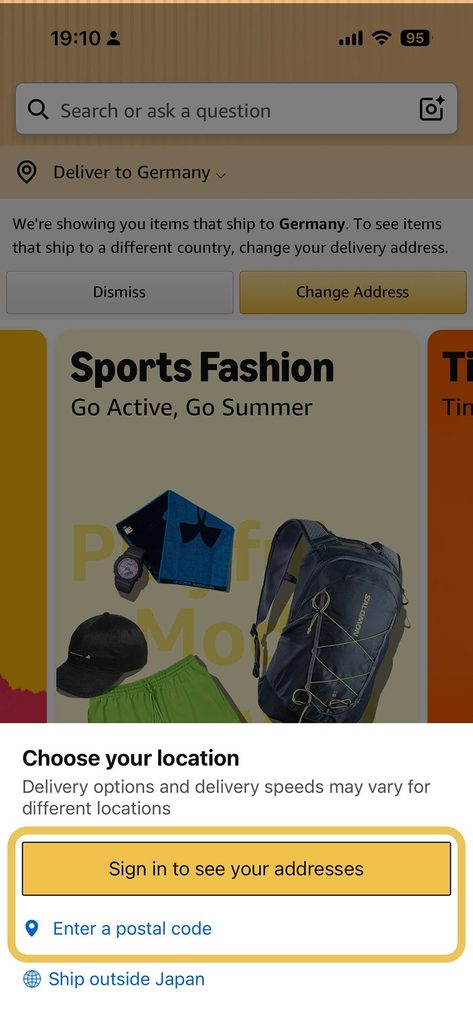
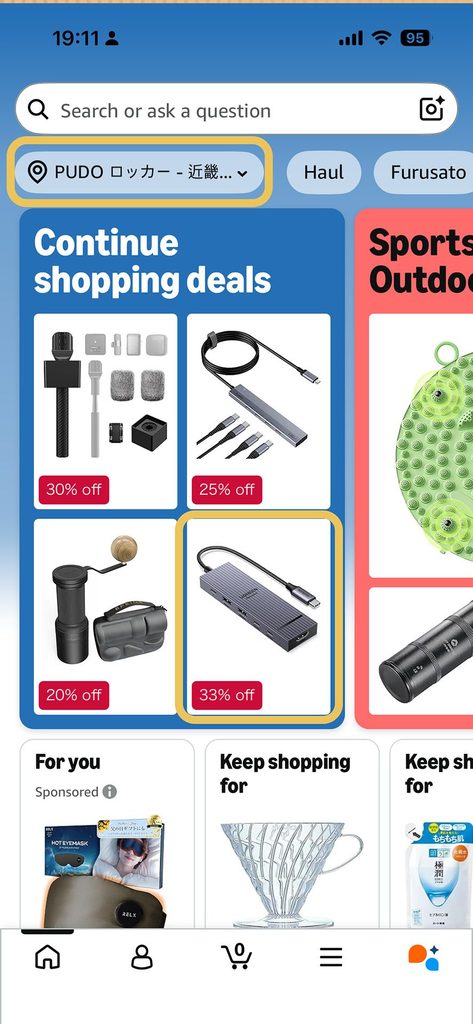
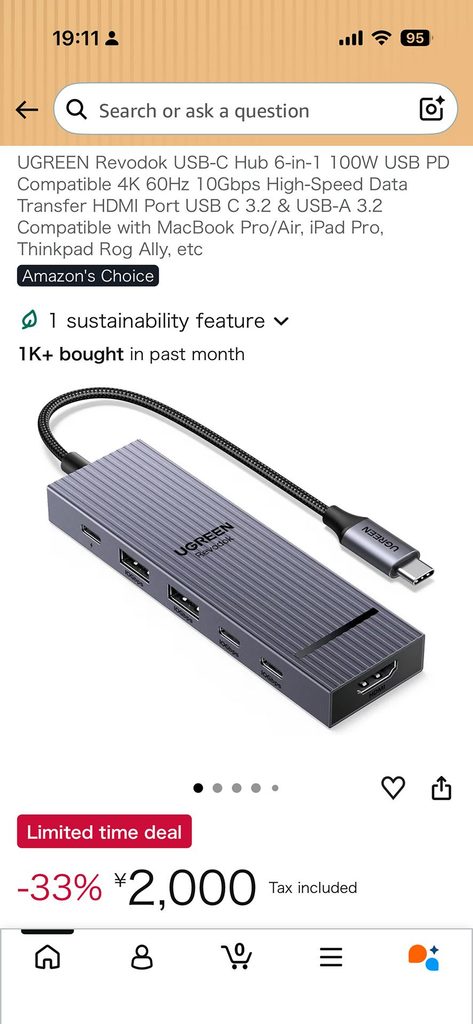
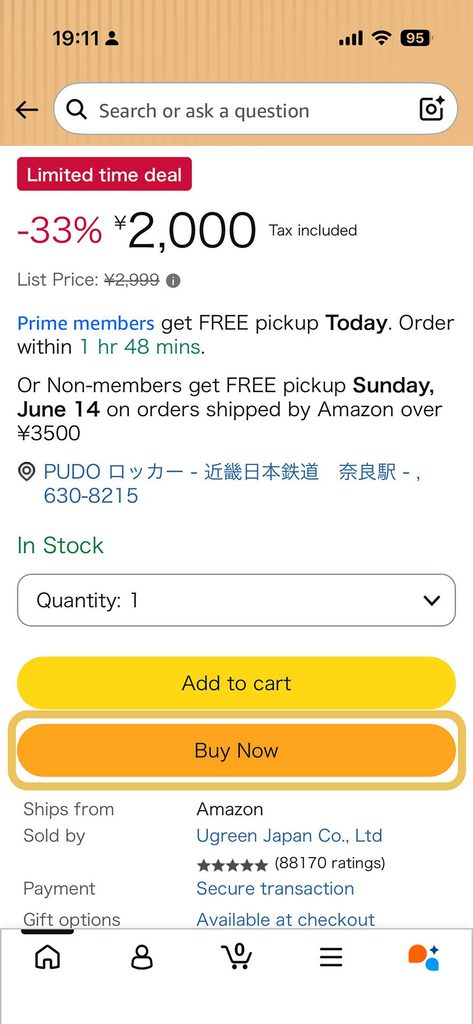
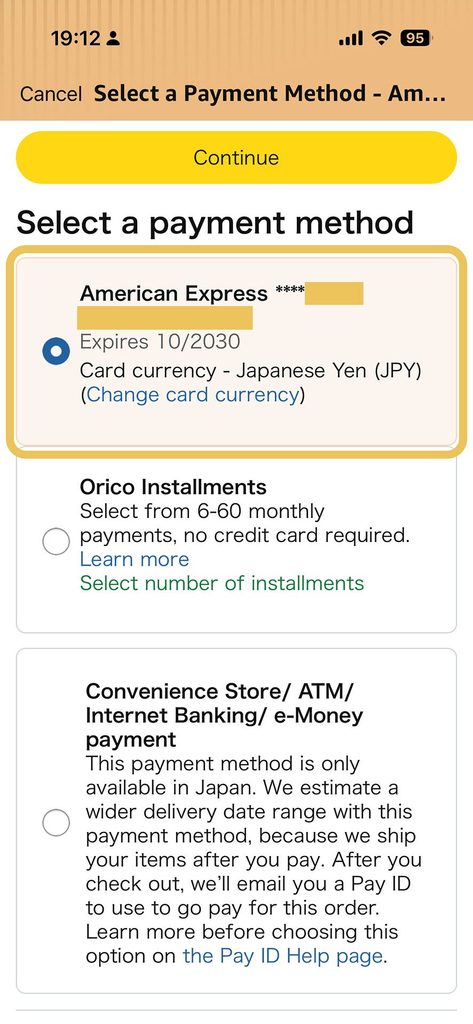
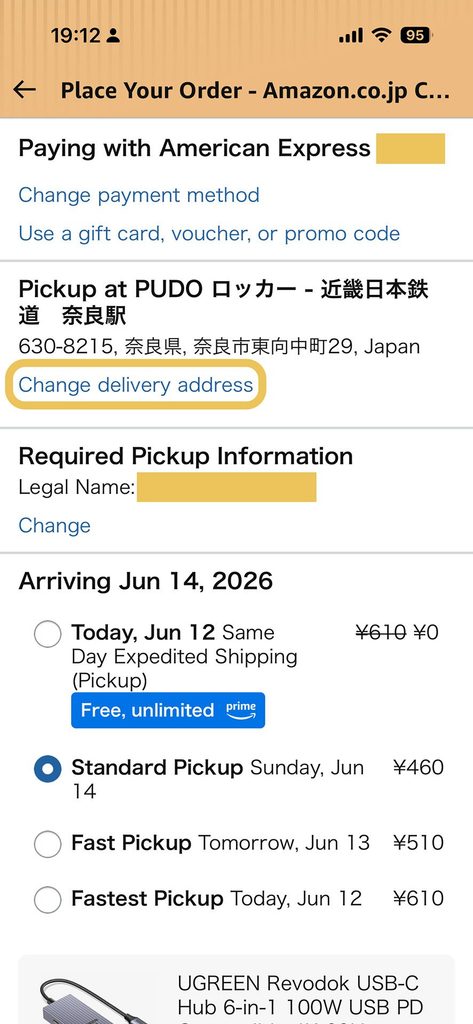
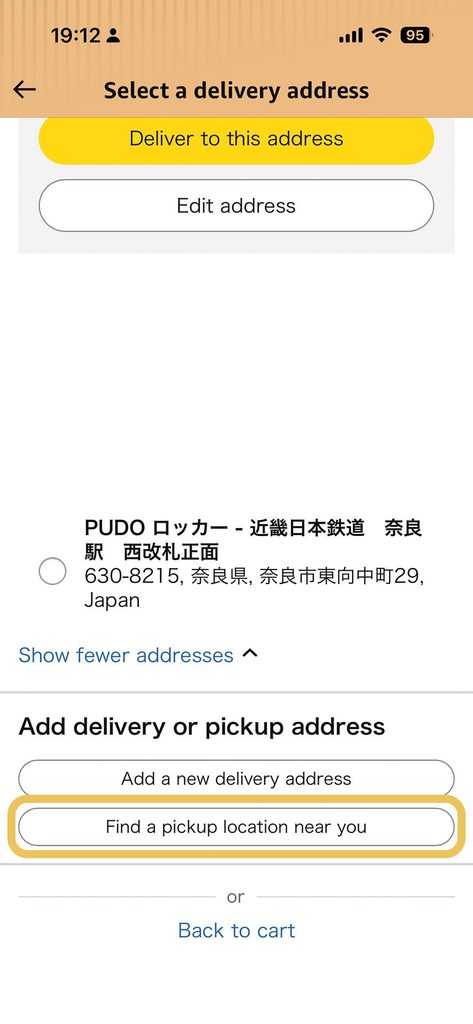
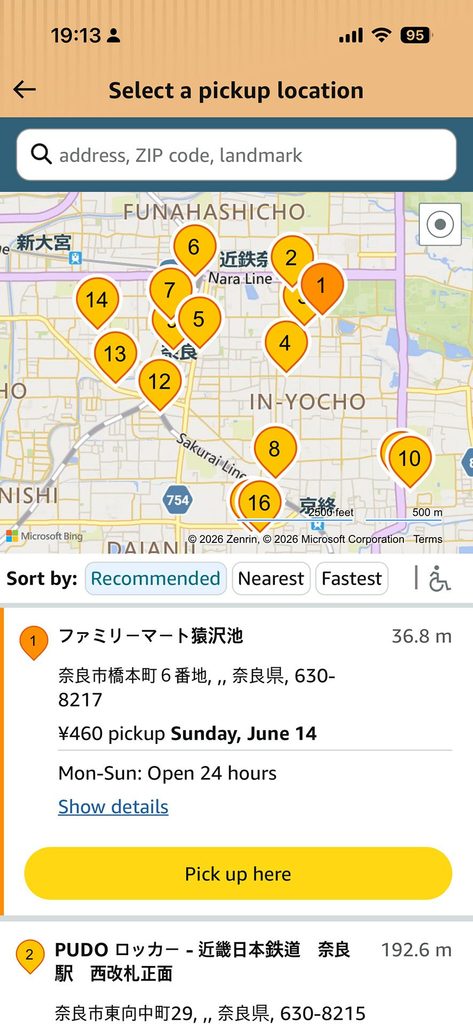
That’s the whole setup. From “I just landed at Narita with no Japanese address” to “I just placed an order to a 7-Eleven locker in Shibuya” is, in practice, under ten minutes of actual work.
Force the Japanese Storefront in the App and Browser
This is the step most guides either skip or get slightly wrong, and it’s the one that, when missed, makes the whole experience feel broken.
Amazon’s storefront detection is aggressive. If the app detects you’re connecting from a German IP address, it’ll quietly switch to amazon.de. If you fly to Tokyo and connect through the airport Wi-Fi for the first time, you may briefly see the JP app, and then it re-detects your home network the next time you open it, and you’re back on amazon.de. The result is that you think you have a Japanese account, but the products and prices you see, and the checkout flow you use, are all from your home country. This is the single most common reason tourists give up on Amazon Japan.
How to force the Japanese storefront and keep it there:
- In the mobile app: Open the hamburger menu (≡) → “Settings” → “Country & Language” (or “Country/Region” in older builds). Switch the country to Japan, and the language to either 日本語 (Japanese) or English, whichever you prefer. The app will redownload the JP catalogue and apply the JP pricing. This may seem bothersome, but it will stay on Japan even if your IP changes.
- On the website: Scroll to the very bottom of any amazon.co.jp page. In the country/region selector (the small flag icon next to the address), explicitly pick Japan. Don’t let the page auto-redirect you away.
- If the site keeps bouncing you back, some browser cookies can override the country setting. Clear cookies for amazon.com and amazon.co.jp, restart the browser, and try again. Going through the affiliate link in this article takes you straight to amazon.co.jp with the country pre-set, which is the cleanest way to start.
After you do this the first time, the app remembers. I haven’t had to reset it in years.
Where to Send Your Deliveries
This is the part of Amazon Japan that actually makes it useful on a moving trip, and it’s the bit that almost no English-language guide covers properly. You have four real options. In order of how often I use them.
Amazon Locker
Amazon Lockers are available in two types, and how you collect your package depends on which one you’re using.
Amazon Locker with a screen: Open your delivery confirmation email (or go to “Track Package” in Your Orders) and find your 6-digit pickup code and barcode. Enter the code on the locker’s touch-screen display, or scan the barcode using the scanner just below the screen. The correct slot opens and you take your package.
Amazon Locker without a screen: You’ll need the Amazon Shopping app on your smartphone with both Location and Bluetooth turned on. Open your delivery confirmation email and tap “Start Pickup” or find it via Your Orders in the app, then select “Track Package,” connect to the locker, and tap “Open Locker.” The correct slot opens automatically.
In both cases, the hold window is 3 calendar days after delivery. Miss that window and the package is returned to Amazon with a full refund issued. One handy feature: if you want someone else to collect on your behalf, simply forward them the delivery confirmation email. It contains everything they need, such as the pickup code, barcode, or Start Pickup button. For screenless lockers, they’ll also need a Bluetooth-enabled smartphone with the latest version of the Amazon Shopping App.
PUDO Station / FamiLocker
Amazon Japan also works with PUDO Stations and FamiLockers. Simply hold your QR code/barcode over the reader on the unit or enter your pickup code manually, and the door opens. Remove your package, close the door, and press “Pickup Successful.”
The hold window here is also 3 days from the delivery date. If you miss it, your order is cancelled, and you receive a full refund.
Convenience Store (Konbini) Pickup
Amazon Japan partners with Lawson, MiniStop, and FamilyMart for konbini pickup. The hold window is 4 days from delivery.
What you need to collect your package depends on the chain and method:
- Lawson or FamilyMart (barcode method): After your package arrives, Amazon sends a barcode to your registered email. You can also find it in Your Orders. Show the barcode on your phone screen or on a printed paper at the store counter, and the clerk will hand over your package.
- Stores using in-store terminals (where the barcode method isn’t supported): You’ll need your pickup code (a tracking number and a certification number). Enter it into the in-store touch-screen terminal to generate a pickup ticket, then take that ticket to the cashier.
Tip: If you lose the confirmation email, you can find your pickup code or barcode in Your Orders, or check the Message Center in your Amazon account.
A few practical notes from Amazon’s official help page: bags are not provided with your package at the store, and in some cases you may be asked to show ID. Once a package arrives at a store, it cannot be redirected. If you want to change the delivery location, you must do so through Your Account before the shipment is prepared.
Yamato Transport Transportation Centers
Pickup at a Yamato Transport depot requires your parcel tracking number (from your shipping confirmation email or Your Orders) plus a valid photo ID — such as a passport, driver’s licence, health insurance card, student card, or employee ID. Present both to a clerk at the counter. The hold window is 7 days from delivery, the longest of any option. Not all Yamato centers support store pickup; those closed on weekends or without a pickup facility won’t appear in the location search results.
Amazon Japan pickup options at a glance:
| Option | Hold period |
|---|---|
| Amazon Locker | 3 days |
| FamiLocker / PUDO Station | 3 days |
| Lawson / MiniStop / FamilyMart | 4 days |
| Yamato Transport center | 7 days |
One small etiquette note for after you’ve collected the parcel: don’t leave the empty Amazon box at the konbini or in a public bin. Take it back to your hotel to break down and recycle, or carry it to a proper recycling point. Public trash disposal is taken seriously in Japan and the empty box is awkward to get rid of on the street.
Hotel and ryokan reception
If you’re staying somewhere for a few nights, sending the parcel to the hotel is the easiest option. Almost every hotel and ryokan in Japan is accustomed to receiving parcels on behalf of guests, including Amazon parcels with non-Japanese sender names. The format the address field expects is:
- Postcode (7 digits, with a hyphen if you want — both work)
- Prefecture + city + district (e.g.
東京都渋谷区神南1-1-1) - Building name + room number / guest name (e.g.
サンプルホテル 305号室, ゲスト: JOHN DOE) - Phone number — your international one is fine, with the country code in front
Most hotels are also happy to receive parcels a day or two before your check-in, which means you can send your order from home, time the delivery for the day you arrive, and have it waiting at the front desk when you walk in. In some cases, hotels don’t want to handle extra packages, so it’s best to ask in advance as a courtesy.
Doorstep delivery (and why it’s safe in Japan)
For holiday homes, long-stay rentals, or rural properties without a konbini for miles, doorstep delivery is genuinely fine in Japan. The country is one of the safest in the world for unattended parcels. The courier will ring the bell, and if nobody answers, they will (with rare exceptions) leave the parcel in a sheltered spot by the door, marked “delivered” with a photo. Theft is essentially a non-event.
I’ve used this for cases of water, snacks, and similar supplies on a rural-stay trip, and the only thing that required a second thought was making sure the courier had a phone number where I could be reached, which brings us back to “your international mobile is fine”.
Is the Price Actually Worth It? (And What About Tax-Free?)
The honest answer is “it depends on what you’re buying”, and there are two parts to the question.
On big-ticket items: phones, laptops, headphones, cameras, audio gear, the Apple Watch, Nintendo Switch and games, mechanical keyboards — Amazon Japan is, in 2026, often cheaper than the equivalent in the US or EU, even after international shipping. The yen has been persistently weak, the Japan-specific products sometimes have features (cellular bands, Japanese-language keyboards, JP power plugs) that aren’t sold in your home market, and the Japanese domestic pricing on consumer electronics is genuinely competitive. Before you assume the home-store price wins, it’s worth doing a quick comparison.
Two honest caveats on the big-ticket side:
- Tax-free is not available on Amazon. The 10% Japanese consumption tax applies to every Amazon Japan order — there’s no tourist-tax-free mechanism like the ones at Yodobashi, Bic Camera, or Don Quijote. The price you see is the price you pay, plus shipping.
- Warranty support is sometimes Japan-only. On some electronics, the local manufacturer warranty is for Japan only. International travellers should treat Amazon Japan as a parallel channel to their home retailer, not a replacement, and make decisions on a per-product basis.
For Japanese-only items: the price question doesn’t really apply because the alternative is “you can’t buy this at all”. Snacks, certain cosmetics, Japanese-only electronics, regional souvenirs, hobby supplies, vintage games, Japanese-only tools. The only realistic way to get them outside Japan is a Japanese Amazon account, a forwarding service, or a friend in Japan. Of the three, Amazon Japan is by far the easiest.
Editor’s Choice of Amazon Japan Products
For a sense of what that looks like in practice, here are six products I’ve actually ordered on Amazon Japan on recent trips. Every link is a real ASIN that resolves to a live product page on amazon.co.jp right now; click them, and you’ll land on the Japanese storefront with our affiliate tag applied. Prices are what they were when I last looked, and the JPY price often beats the equivalent in your home Amazon store once the weak yen is factored in.
Tokyo Banana
The iconic Tokyo souvenir sponge cake, banana-shaped, filled with banana custard cream. You can find these at every Tokyo train station and in the Narita arrivals hall, but the 12-piece box is what you want to bring home as a gift. They are individually wrapped so you can share them perfectly with friends, family, or co-workers!


Pocky Strawberry
These strawberry-flavoured Pocky are what most Japanese grew up with. It’s a nostalgic flavour that you can only get in Japan. The export version uses a different strawberry formula and is more expensive. Buying in bulk at ¥1,745 for 8 bags x 6 packages is exactly the right amount for gifting or even for yourself.
Refurbished Nintendo DS
Skip the endless rummaging through second-hand store shelves: Amazon Japan has a solid selection of refurbished Nintendo DS consoles ready to go, and ordering ahead means you can pick it up the moment you arrive and jump straight into gaming. Why spend your precious travel time hunting through aisles when you can sort it in five minutes from your couch?


One Hub, Six Ports, Zero Compromises USB-C Hub
If your laptop is always running out of ports, this 6-in-1 USB-C Hub is the fix: it lets you charge with Power Delivery (PD), transfer files, and connect multiple devices all at the same time without breaking a sweat. The metal body keeps heat low even during heavy use, and supports transfer speeds of up to 10 Gbps. Whether you’re a creative juggling external drives and displays or just someone tired of unplugging one thing to plug in another, this hub handles it all. Best part? It’s cheaper than you think on Amazon Japan.
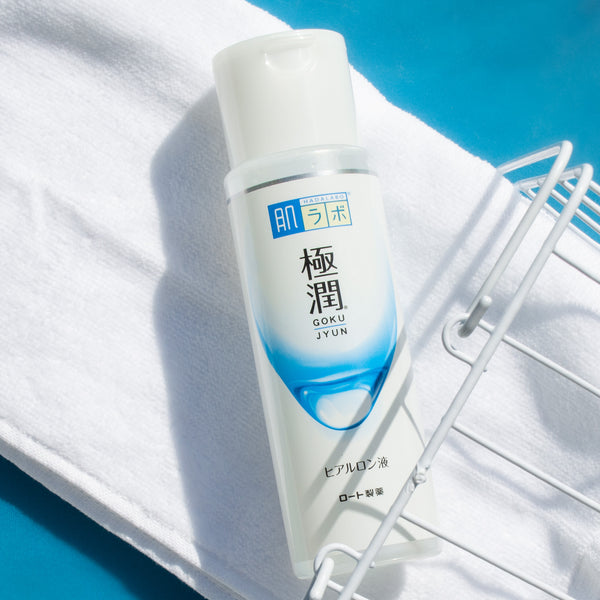
Japan’s Most-Loved Hydration Secret: Hada Labo Gokujyun Hyaluronic Acid Lotion
Hada Labo Gokujyun Hyaluronic Acid Lotion is the product Japanese skincare swears by: multiple types of hyaluronic acid, deep-lasting moisture, no grease, no fragrance, plays well with everything. The 400ml pump works out to around ¥4 per ml, making it the best-value hyaluronic acid toner of this quality anywhere. 4.3 stars across 3,000+ Amazon Japan reviews, and worth noting: the export version uses a different, inferior formula.
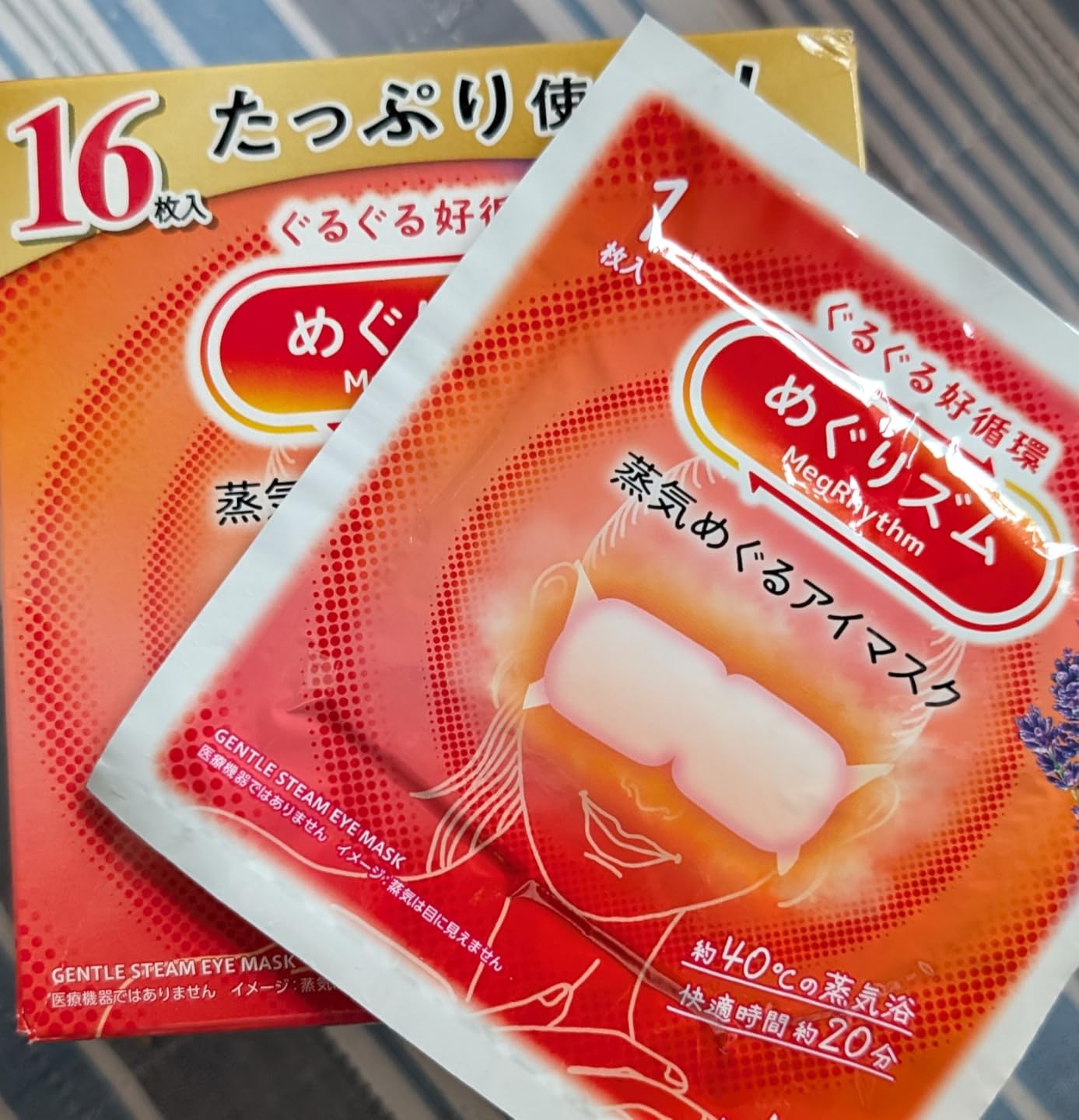
Kao Megurism Steam Eye Mask
The Kao Megurism Steam Eye Mask is a staple in Japanese self-care routines, and once you’ve tried it, you’ll understand why it flies off shelves. Each single-use mask gently warms to 40°C within seconds of opening and lasts for 20 minutes. Perfect after a long-haul flight, a day of staring at screens, a hangover, or just a bad night’s sleep. The 16 Eye Mask Edition is exclusively available on Amazon Japan.
Each link is to the Japanese storefront with the affiliate tag applied. Prices and availability are live from amazon.co.jp the moment you click; if the page auto-redirects you to your home Amazon page, follow the “force the Japanese storefront” instructions above. The list above is by no means exhaustive; it’s just the six I’ve personally ordered and re-ordered on recent trips. Once you start browsing, you’ll find the catalogue is several orders of magnitude larger than what you see on the global Amazon site, and most of it genuinely can’t be sourced any other way.
Returns, Refunds, and Customer Support
This is the bit most “Amazon Japan for tourists” guides skip, and it’s the one I’d want to know if I were setting this up for the first time. So:
- English Customer Support, No Japanese Required. Amazon Japan’s customer support is available in English, 24/7. To reach them, open the app, tap the hamburger menu → “Customer Service” → “Contact us” → choose the topic → choose “Chat” or “Email”. First-line support is available in English, and they will refund or replace anything covered by the standard Amazon A-to-Z guarantee. You do not need to speak Japanese.
- Refunds are returned to the original payment method. International Visa, Mastercard, or American Express. The timeline works in two stages: Amazon processes the refund within 2–5 business days of receiving your returned item, then your card issuer takes additional time to post the credit. Realistically, budget 5–10 business days in total from the moment your return reaches the warehouse. International cards can occasionally take longer depending on your bank.
- Returning from a Hotel or on the Move. If you’re still in one place, you can arrange a courier pickup directly from your hotel. Once you initiate the return in the app, choose the pickup option — a Yamato Transport driver will come to your address and bring the shipping label with them, so you don’t need to print anything. Your hotel reception should be able to handle the handoff.
- If you’re already moving between cities, the easier option is a drop-off. Japan has three convenient choices:
- Convenience stores (Lawson or FamilyMart): scan a QR code at the in-store machine, hand the parcel to the cashier. There’s one on almost every corner.
- PUDO lockers: scan the QR code in your Amazon return email at the locker terminal, then place your parcel inside.
- Yamato Transport offices: scan at the Nekopit terminal and hand over the package.
- Note: if you choose courier pickup, you cannot redirect to a locker or convenience store.
- If you’re already moving between cities, the easier option is a drop-off. Japan has three convenient choices:
- If you only have a few days left in Japan and you need to return something: don’t wait. Amazon Japan’s return window is 30 days from delivery for most items, so timing isn’t the problem; logistics are. If you only have a few days left in Japan, start the return immediately. Choose the convenience store or PUDO locker drop-off option, as these are the fastest to action and don’t require waiting for a courier window. You’ll receive a return confirmation from Amazon quickly, though the actual refund typically takes several days after your item reaches the warehouse.
Quick tip: Convenience store drop-offs (Lawson, FamilyMart) are the most tourist-friendly option in Japan. No Japanese needed, no scheduling, and there’s almost always one nearby.
The “Auto-Redirected to My Home Country” Gotcha
Worth a section of its own, because this is the one thing that, if you don’t know about it, makes the entire setup look like it’s broken.
You have a Japanese Amazon account. You open the app in Tokyo. The page that loads looks suspiciously like the home version of Amazon in your home country, with the wrong catalogue, prices, and language. You start thinking the account didn’t work. What actually happened is the storefront re-detection kicked in and pointed you back at your home Amazon.
Three things to try, in order:
- Open the app’s hamburger menu → “Settings” → “Country & Language” and re-select Japan. This fixes it 95% of the time.
- On the website, scroll to the very bottom and re-pick Japan in the country/region selector. Sometimes the app’s setting and the website’s setting are independent.
- As a last resort, clear cookies for amazon.com and amazon.co.jp in your browser, restart your browser, and navigate directly to amazon.co.jp. Don’t Google “Amazon Japan”. That’s what started the redirect in the first place.
Once the app is set to Japan, the setting sticks. You can fly to another country, change your SIM, and the app will continue serving the Japanese catalogue as long as you don’t explicitly switch it back.
FAQ: Amazon Japan for Tourists
Do I need a Japanese phone number to use Amazon Japan?
No. Your regular international mobile number is fine. The signup form asks for the country code, then the local number, and sends a 6-digit verification code by SMS. If your number doesn’t reliably receive SMS (some VoIP services struggle), use the “Call me instead” option. The code is read out by an automated call.
Do I need a Japanese credit card?
No. International Visa, Mastercard, and American Express cards work on amazon.co.jp without any extra setup. The billing-address fields accept non-Japanese addresses, and the charge shows up on your home statement in your home currency, converted by your card network at the standard wholesale rate.
Do I need a Japanese address?
Not to create the account or start shopping. You will need a delivery address for the first order, and the easiest options are: (1) a Hub Locker in the city you’ll be in, (2) a konbini (Lawson or FamilyMart) for a 4-day pickup window, (3) your hotel or ryokan (most accept parcels on behalf of guests), or (4) your own accommodation’s doorstep. None of these requires a permanent Japanese address.
Can I pick up my parcel without a Japanese phone number?
Yes. The Amazon app generates a one-time pickup code for every parcel that goes to a Hub Locker or a konbini. For Hub Lockers, you scan the code from the app at the locker. For konbini pickup, Amazon emails you a barcode (or a two-code slip), and you show it at the register. No phone number is asked for at either.
Does Amazon Japan offer tax-free shopping for tourists?
No. The 10% Japanese consumption tax is included on every Amazon Japan order, and there is no tourist-tax-free mechanism (that benefit applies to physical stores with the right paperwork, like Yodobashi or Bic Camera). On big-ticket items where the pre-tax Amazon Japan price is still meaningfully lower than your home store, the saving can still outweigh the tax, but the comparison should always be done on the final, post-tax Amazon Japan price.
Can I use the same Amazon account I already have at home?
No. amazon.co.jp and amazon.com (or amazon.de, amazon.co.uk, etc.) are separate accounts with separate logins, order histories, and balances. You can keep both at the same time, and the Japanese account is a clean, fresh signup. The Japanese account does not need to be linked to, or share a payment method with, your home account.
Final Thoughts: How to Use Amazon Japan When Travelling
The whole thing, end-to-end, is: open amazon.co.jp, sign up with your international email and phone, add an international credit card, set the app to Japan, pick a delivery option that works with how you’re travelling (Hub Locker, konbini, hotel, or doorstep), and start shopping. Five minutes to set up, a couple of days of shipping, and the parcel is waiting for you, sometimes before you’ve even boarded the plane.
In my experience, it is the single most underrated tool for a trip to Japan. Most travellers who find out about it end up wishing they’d set it up the first time. The reason it stays underrated is the part that confuses everyone: the storefront auto-redirect, the perceived residency requirements, the Japanese-language app interface. None of those are real obstacles once you know they exist. This is the playbook I wish someone had handed me the first time I had to figure out how to use Amazon Japan when travelling — five minutes of reading, then a working account with parcels in lockers for the rest of the trip.
Two things to do now, if you’ve read this far:
- 👉 Set up your Amazon Japan account (free, international cards accepted)
- 👉 If you want the rest of the kit I use to actually make a Japan trip work — eSIM, VPN, ride-hailing, taxi, navigation — read Must-Have Apps for Travelling to Japan, the best VPN for travel, and the three-piece travel setup I use to carry all of it. The same articles are linked throughout this guide.
If you want more first-hand Japan guides like this one as I publish them — including curated Google Maps lists for Tokyo, Kyoto, Kansai, Nara, and Hiroshima — subscribe to the Midair Times newsletter. We don’t spam. Pinky promise.
This article was written by Lasse Dyre, founder of Midair Times. Affiliate partnerships are disclosed at the top of the page and in our editorial standards; they never influence the verdict.
Leave a Reply